
Time tracking for agencies, from the project budget to the client invoice
Know what every client really earns you. Clockaroo is time tracking and invoicing for design, development and marketing agencies and studios: your team tracks hours against clients and projects, budgets warn you before a project runs over, and approved hours turn into client invoices. One flat price per person, with no fees per client, project or invoice.
Start free Team free for 14 days, no card. Then $9 per person a month.
Clients, projects and tasks
Each client has projects, and each project has tasks such as design, development or project management. Projects are billable or not, so pitches, internal work and your own website stay out of client hours and still show in reports. People track with a timer or a week timesheet, and they can add their calendar from an iCal link and turn a meeting into a time entry. The app only reads the calendar.
Team members see their own hours. Rates, amounts, costs and profit stay with the owners.
Budgets per project or per month
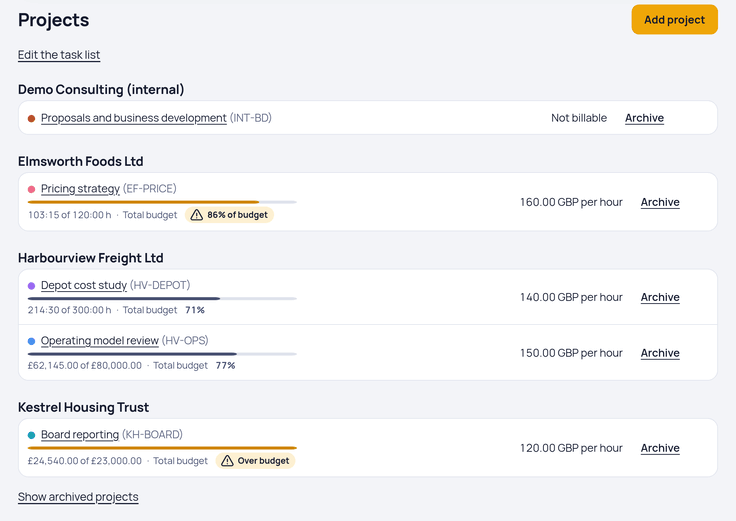
Give a project a budget in hours or in the client's currency, for the whole project or for each month. A monthly budget suits a retainer with a set number of hours. Owners get an email when a project reaches 80% and again at 100%, and the projects list shows how much of each budget is used. When a client accepts a quote, the quote can set the project's budget.
Rates per project and per person
Each project has an hourly rate. When a senior designer bills more than a junior one on the same project, give that person their own rate on it; it wins over the project rate. Each entry keeps the rate it was tracked at, so a new rate applies to new hours only. Rates are in the client's currency: euros, US dollars or pounds.
Approve the week
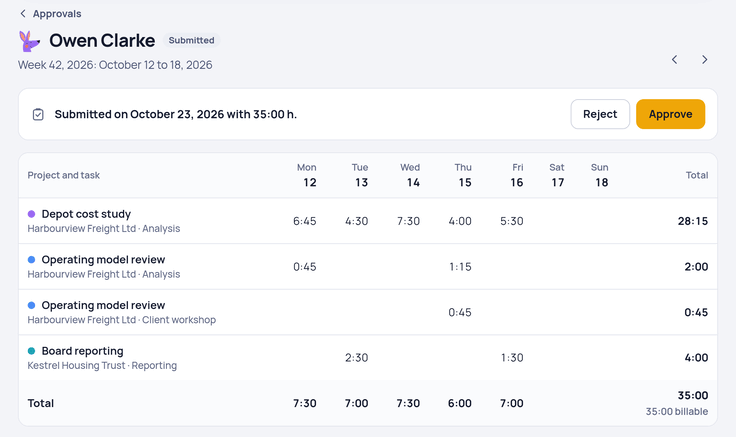
Each person submits their week. An owner approves it, or rejects it with a note that the person sees on the week and gets by email. With the setting “Only approved hours can be invoiced”, invoice drafts take hours only from approved weeks. An approved week is locked; only an owner can reopen it.
Profit per client and project
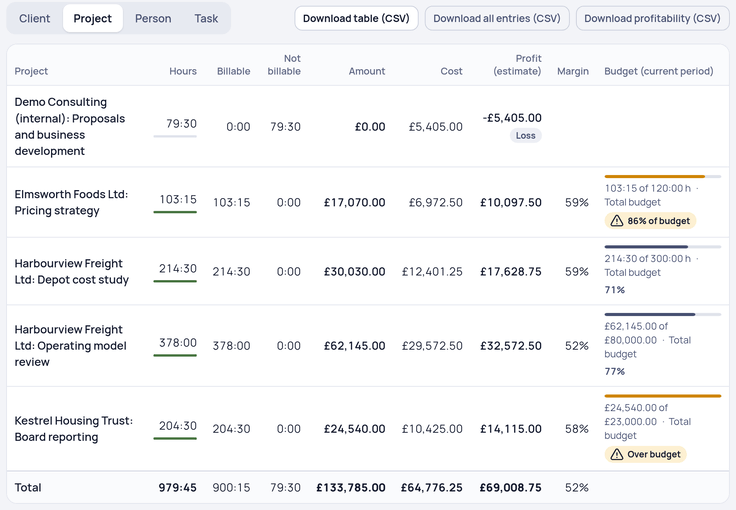
Owners give each person a cost rate: what an hour of their time costs the agency. Reports then show costs next to the billable amounts and an estimate of the profit per project, client and person. Hours nobody pays for lower the profit, so you see which clients take more time than they pay for. The report has a switch to hide costs before you share your screen.
Client invoices
Pick a client and a period, and the unbilled hours become an invoice draft, grouped by task, person or project. Billable expenses come along, with an optional markup per project. A fixed monthly or quarterly fee, such as a retainer, can go out as a recurring invoice, and a fixed-price quote the client accepts becomes a draft in full or in parts. Unpaid invoices get up to three reminders, by hand or on the days you choose.
Each client has an invoice language: English, German, Dutch or French. For business clients in Germany and Austria, the invoice also goes out as an XRechnung or ZUGFeRD file, checked before it's sent. Invoicing works for businesses based in Germany, Austria, the Netherlands, the UK, Ireland and the US; elsewhere you can track time and export it.
What it doesn't do
Clockaroo keeps to time, budgets and invoices. It has no resource scheduling or capacity planning, no task boards and no client portal. There are two roles, owner and member, so there is no project manager role: owners approve weeks and see the money. It runs in the browser, with no desktop or mobile apps, and it doesn't connect to project management tools yet. If you need those in one place, an agency management suite fits better.
Moving from another tool
From Toggl Track or Clockify, upload a CSV export and check the clients, projects and hours before anything is imported; the Toggl Track comparison shows how the two differ. From Harvest, the import reads clients, projects, tasks, rates, time entries and invoices through the Harvest API.
Price
Team costs $9 per person a month, or $7 billed yearly, plus VAT where it applies. Clients, projects and invoices never cost extra, and your tax adviser or bookkeeper gets read-only access at no cost. See pricing.
Agencies and consultancies bill much the same way: see time tracking for consultants, and our guide to billable hours for what counts and how rounding changes the bill.
Questions
Who counts as a person?
Everyone who tracks time in your workspace, freelancers you bring in included. Clients who receive invoices are free.
Can a project manager approve timesheets?
Only owners approve. You can make a project manager an owner, who then also sees rates and amounts.