
Time tracking for lawyers: billable hours by matter, then the invoice
Clockaroo gives solo lawyers and small firms clean billable hours by matter and turns them into an invoice without retyping a line. Each matter is a project under its client, every entry carries its narrative, and only the hours you approve get billed. It does time and billing and nothing else; trust accounting stays in your accounting software, and this page is plain about the limits.
Start free Team free for 14 days, no card. Then Free for one person, or $9 per person a month.
Matters as projects
Create a client, then a project for each matter, with your matter number as the project code. Tasks describe the kind of work, such as research, drafting, calls or hearings. Pro bono and internal work go on projects that aren't billable, so they never reach an invoice and still show in your reports.
Record time with a timer or type it into a week timesheet: 1:30, 1.5 and 45m all work. Each entry has a note of up to 2,000 characters for the narrative: who you spoke to and what about, which document you drafted. Detailed entries are what fee reviews ask for. The U.S. Trustee Program's fee guidelines for bankruptcy cases, for example, say services “should be noted in detail and not combined or ‘lumped’ together”.
Six-minute units and rounding
Lawyers often bill in tenths of an hour, 6 minutes each. Two places where such a unit is written down: the same U.S. Trustee guidelines ask for time “in time periods of tenths of an hour”, and in England and Wales, when a court assesses costs, routine letters, emails and calls will “in general be allowed on a unit basis of 6 minutes each” (Civil Procedure Rules, Practice Direction 47, paragraph 5.22). Outside rules like these, the unit is whatever your engagement letter says.
Clockaroo records and bills exact minutes, and it has no rounding setting. If you bill in tenths or quarter hours, the billable hours calculator rounds per entry or on the total and has a minutes-to-tenths chart. Our guide to billable hours explains what each method does to the bill.
Rates for each lawyer on a matter
Give each matter an hourly rate. When a partner, an associate and a paralegal work on the same matter, give each person their own rate on it; it wins over the matter's rate. Each entry keeps the rate it was tracked at, so a rate change applies to new hours only. Amounts are in the client's currency: euros, US dollars or pounds.
For a flat fee, send a fixed-price quote. Your client opens it from a link, without an account, and accepts or declines it. An accepted quote becomes an invoice draft, in full or in parts.
Check the hours before they're billed
In a firm, each person submits their week, and an owner approves it or sends it back with a note. With the setting “Only approved hours can be invoiced”, a draft takes hours only from approved weeks. An approved week is locked, and only an owner can reopen it.
The invoice
Pick a client and a period, and the unbilled hours become an invoice draft, grouped by task, person or project, with one line per group and hourly rate. Billable expenses, entered with their receipts, can go on the same invoice. When you issue it, the number is assigned and the invoice is locked; a correction goes through a credit note. Unpaid invoices can get up to three reminders, sent by you or on the days you choose.
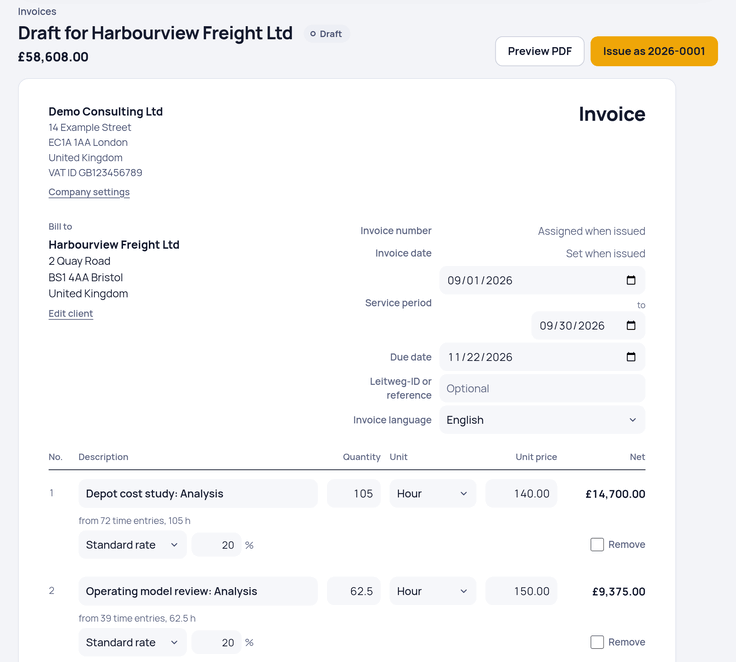
The invoice doesn't list each time entry. When a client wants the detail, export the report for that matter as CSV: one row per entry with the date, person, task, hours, amount and note. Invoices can be in English, German, Dutch or French, set per client. Invoicing works for firms based in the US, the UK, Ireland, Germany, Austria and the Netherlands; elsewhere you can track time and export it.
What it doesn't do
Clockaroo doesn't hold client money or keep a trust or client account ledger. Money a client pays on account usually belongs in a separate account under your regulator's rules; in England and Wales, for example, the SRA Accounts Rules require client money to be “paid promptly into a client account” (rule 2.3). Keep that ledger in your accounting or practice management software. A fixed monthly fee can go out as a recurring invoice, but the app keeps no balance of money paid in advance, and it can't issue advance payment invoices.
It also has no conflict checks, document management, court deadlines or LEDES and UTBMS billing codes, and it doesn't split one invoice between several payers. If you need those, a practice management system for law firms fits better.
Access and security
Team members see their own hours; rates and amounts stay with the owners. Owners can require two-factor authentication for everyone in the workspace. Your accountant can get read-only access to issued invoices, reports and expenses at no cost. A ZIP export of all your data, with the original file of every issued invoice, is there on every plan.
Price
Team costs $9 per person a month, or $7 billed yearly, plus VAT where it applies. Free covers one person with up to 5 invoices a month. Clients and matters never cost extra. See pricing.
Moving from another tool? A CSV export from Toggl Track or Clockify comes over with its clients, projects and hours; see the Toggl Track comparison. For a firm that also runs projects for clients, see time tracking for agencies.
This page describes the software. It isn't legal or ethics advice; your bar or law society sets the rules for fees, bills and client money.
Sources
- U.S. Trustee Program: Guidelines for reviewing applications for compensation (28 C.F.R. Part 58, Appendix A), section (b)(4)(v), read October 24, 2026
- The Law Society: Can I charge for routine communications? (quotes CPR Practice Direction 47, paragraph 5.22), read October 24, 2026
- Solicitors Regulation Authority: SRA Accounts Rules, rule 2.3, read October 24, 2026