
Time tracking for consultants, from billable hours to the invoice
Clockaroo is time tracking software for independent consultants and consulting firms. You track hours against clients and projects, set a rate per project and per person, watch budgets, approve each week, and turn the approved hours into an invoice. One price per person, with no fees per client, project or invoice.
Start free Team free for 14 days, no card. Then Free for one person, or $9 per person a month.
Every hour against a client and a project
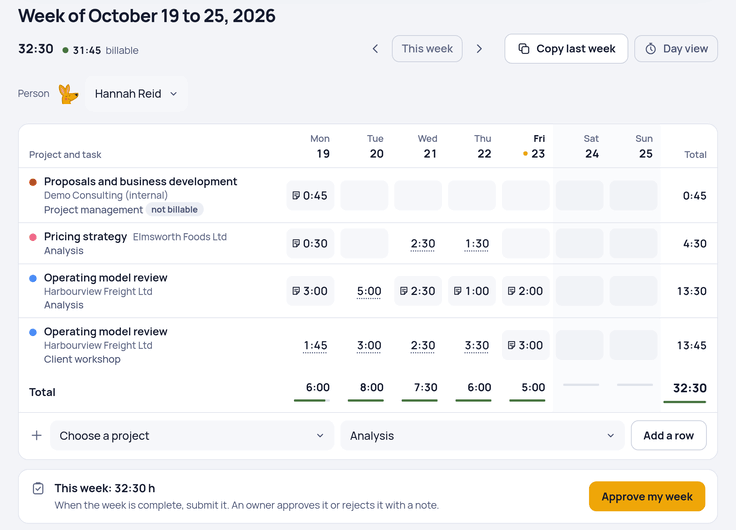
Start the timer when you begin a call or a piece of analysis, or type the week's hours on Friday. Write 1:30, 1.5 or 45m; all three work. Every entry has a project, a task and a note, so the invoice can say what the time was for. Projects are billable or not, which keeps internal work, proposals and business development apart from the hours a client pays for.
Rates per project and per person
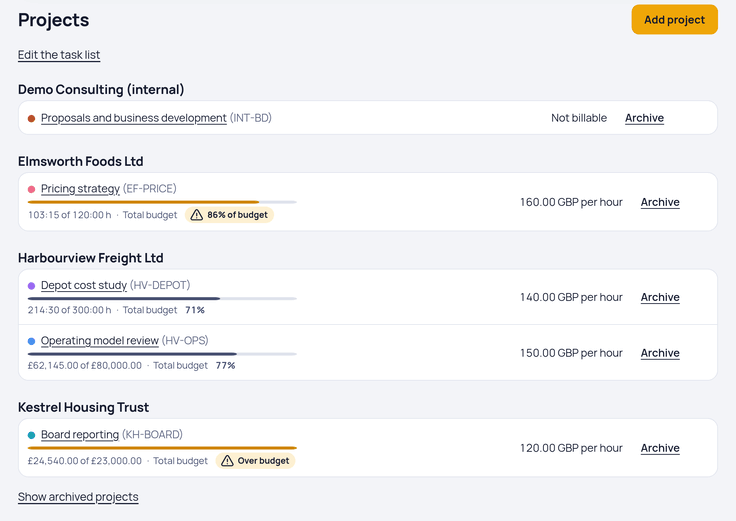
Give each project an hourly rate. When a senior consultant bills more than a junior one on the same engagement, set a person's own rate on the project; it wins over the project rate. Amounts use the rate stored with each time entry, so a new rate applies to new hours and doesn't rewrite the past. Rates are in the client's currency: euros, US dollars or pounds.
Rates in Clockaroo are hourly. If you quote a day rate, the consulting rate calculator converts between the two before you set it up.
Budgets that warn you in time
Give a project a budget in hours or in the client's currency. Money budgets count billable time at each entry's own rate, and owners get an email when the project reaches 80% and again at 100%. If the budget changes, the alerts start again from the new amount. Billable time without a rate counts as zero, and the budget page says how many hours that is.
Approve the week before you bill
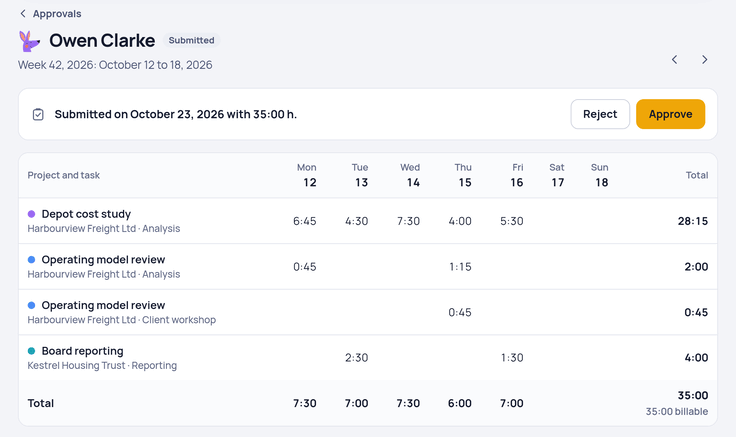
When a week is complete, each person submits it. An owner approves it, or rejects it with a note that the person sees on the week and gets by email. With the setting “Only approved hours can be invoiced”, draft invoices take hours only from approved weeks, so nobody bills a week that hasn't been checked. An approved week is locked; only an owner can reopen it.
What each project earns
Owners can give each person a cost rate: what an hour of their time costs the firm. Reports then show costs next to the billable amounts and an estimate of the profit. Time that isn't billable lowers the profit, so you see which engagements take hours nobody pays for. Only owners see costs and profit, and the report has a switch to hide them before you share your screen.
From hours to an invoice
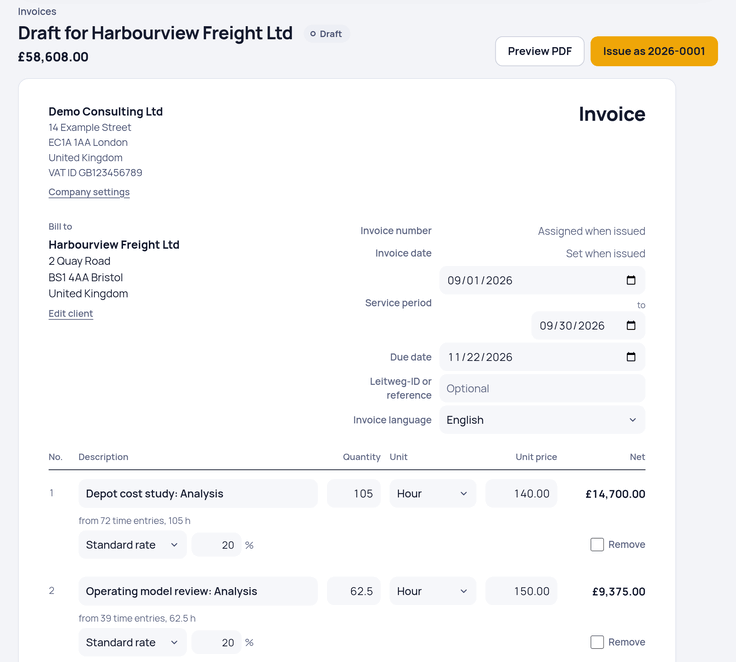
Pick a client and a period, and the unbilled hours become an invoice draft, grouped by task, person or project, with one line per group and hourly rate. Each client has an invoice language: English, German, Dutch or French. When a business in Germany or Austria bills a business client there, the invoice also goes out as an XRechnung or ZUGFeRD file, checked before it's sent. Invoicing works for businesses based in Germany, Austria, the Netherlands, the UK, Ireland and the US; elsewhere you can track time and export it.
Your data stays yours: the export is one ZIP with every table as CSV and the original file of every issued invoice, on every plan.
What it doesn't do
Clockaroo keeps to time and invoices. It has no day-rate field, no proposals or contracts, no CRM and no client portal. If you need those in the same tool, a client management suite fits better.
Moving from another tool
From Toggl Track or Clockify, upload a CSV export and check the clients, projects and hours before anything is imported. From Harvest, the import reads clients, projects, tasks, rates, time entries and invoices through the Harvest API and changes nothing in your Harvest account.
Run a law practice or an agency? See time tracking for lawyers and time tracking for agencies.
Price
Team costs $9 per person a month, or $7 billed yearly, plus VAT where it applies. Free covers one person with up to 5 invoices a month. Clients, projects, tasks and invoices never cost extra. See pricing.
Questions
Who counts as a person?
Everyone in your team who tracks time. Clients who receive invoices are free.
Can team members see rates and amounts?
Team members see their own hours. Amounts and rates stay with the owners, and only owners see costs and profit.
How do I find my real billable share?
Reports show billable and non-billable hours for any period; divide one by the total. The guide to billable hours explains what usually counts. The billable hours calculator helps when hours need rounding before you bill them.
Can I bill by the day?
Not as a day rate. Track the hours of the day and bill them at an hourly rate, or convert your day rate with the rate calculator first.