
Billable hours: what counts and how to turn them into an invoice
Billable hours are the hours of work you charge a client for. This guide covers what usually counts as billable, how to record the time so the invoice holds up, rounding and rates, and how the hours become lines on an invoice. For the arithmetic, use the billable hours calculator: it adds up your times, rounds them and shows the amount.
What counts as billable time
Your agreement with the client decides. Work done for a client on their project is usually billable: the work itself, calls and meetings about it, and changes within the agreed scope. Travel, waiting time and work on your own mistakes are where people disagree, so settle them in the proposal or contract, before the first invoice.
Non-billable time is the work that keeps the business running: admin, sales and proposals, invoicing, training and internal meetings. It still costs you hours, which is why your hourly rate has to cover it. The freelance rate calculator works out a rate from the hours you can actually bill.
Your billable share is billable hours divided by all the hours you worked. We don't quote an average for it, because we haven't found one from a primary source. Track both kinds of time for a few weeks and you have your own number.
Record the time as you work
Write each entry down the same day, while you still know what each block of time was for. An entry needs the date, the client and project, the duration, whether it's billable, and a short note the client can read. The note is what lets the invoice say what the time was for when a client asks.
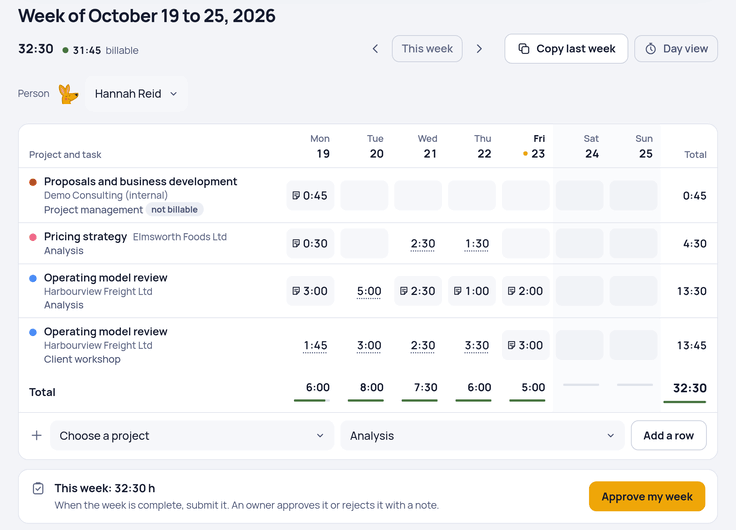
In Clockaroo, you start a timer or type the hours into a week timesheet: 1:30, 1.5 and 45m all work. Every entry has a project, a task and a note. Projects are billable or not, and so is each entry, so internal work stays out of the client's hours.
Rounding: exact minutes or an increment
Some agreements bill exact minutes. Others round each entry to an increment, commonly 6 minutes (a tenth of an hour), 15 or 30 minutes. Rounding each entry up bills more than adding the exact minutes first and rounding the total once, because every short entry gains time. Whichever you use, write the increment and the method into the agreement and apply them the same way on every invoice.
The calculator does both methods and has a minutes to decimal hours chart. Clockaroo itself bills exact minutes and has no rounding setting.
Rates
The amount for an hour is the hourly rate you agreed. In Clockaroo, each project has a rate, and a person can have their own rate on a project, which wins over the project rate. Each time entry keeps the rate it was tracked at, so a new rate applies to new hours and leaves hours you already tracked alone. If you quote a day rate, convert it to an hourly rate first.
From billable hours to an invoice
An invoice line for time is hours times the rate. Take three billable times of 0:50, 1:22 and 0:07 at $90 an hour, plus 0:30 of internal planning that isn't billable. In exact minutes that's 139 minutes, shown as 2.32 h, so the line is $208.80. Rounded up to tenths per entry, the same work is 2.50 h and $225.00. The 0:30 counts toward your tracked time and not toward the invoice.
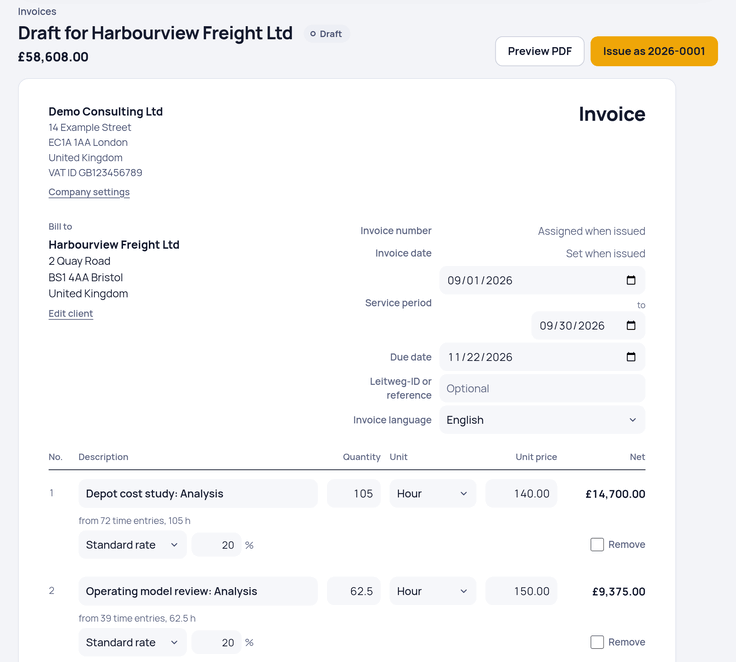
In Clockaroo, you pick a client and a period, and the unbilled billable hours become an invoice draft. Lines are grouped by task, person or project, one line per group and hourly rate, with the hours to two decimals. Hours on an invoice can't go on another one, and an issued invoice is locked; a correction goes through a credit note. If a team checks its weeks first, the setting “Only approved hours can be invoiced” keeps unchecked weeks off the draft. Every invoice also needs a due date: the net 30 guide explains the common payment terms, and the overdue invoice email templates help when the date passes.
Why non-billable hours are worth tracking too
Reports in Clockaroo show billable and non-billable hours per client, project and person. On the Team plan, owners can give each person a cost rate, and the reports then show the estimated profit per project. Time nobody pays for lowers that profit, so you see which work takes more hours than you can bill.
If you bill by the hour for a living, see how this works for consultants, lawyers and agencies.
Questions
Are billable hours the same as hours worked?
No. Hours worked include admin, sales and internal meetings. Billable hours are the part a client pays for under your agreement.
Is travel time billable?
Only if your agreement says so. Some people bill travel in full, some at a lower rate, some not at all. Say which in the proposal.
How do I turn minutes into decimal hours?
Divide the minutes by 60: 20 minutes are 0.33 hours, so 1 hour 20 minutes is 1.33 hours. The calculator's chart lists every minute from 1 to 60.
Stop rebuilding invoices from spreadsheets: track your billable hours and invoice them with a free account. Free covers one person with up to 5 invoices a month; Team costs $9 per person a month. See pricing.